Crossref members register around 37,000 records daily. All this metadata is openly shared with the global scholarly community through our free APIs. We receive over two billion calls to our API each month, signalling its use by hundreds of tools and services worldwide, supporting the discovery and assessment of scholarly metadata. As part of a new series in our blog, we will spotlight the diversity of tools and integrations that rely on Crossref metadata to serve the scholarly community. In this initial post, we chat to Luca Foppiano, the developer and maintainer of Grobid1, to learn about how Grobid uses Crossref metadata to improve the extraction and enrichment of bibliographic information from scholarly PDFs.
On behalf of the Nominating Committee, I’m pleased to share the slate of candidates for the 2026 board election. Every active member organisation is invited to submit a ballot to elect the incoming board class.
We’re providing a summary of the board’s July 2026 meeting. The July board meeting is our only in-person meeting. The board gathers for two days of strategic thinking and long-range planning, as well as conducting annual board business. This year, we focused on allocating surplus funds we have on hand to invest in a three-year project to redesign the content system. In a related discussion, we decided to lower content registration fees starting in 2027 because we’ve had a demonstrated history of generating surpluses, exceeding what we need to run Crossref. We also discussed the board structure, as part of our regular review of stakeholder governance. And we conducted annual board business, such as approving the audited financial statements and reviewed our risk register and mitigation plans.
The resolutions are available on the dedicated section of our website, which also lists the members of the Board and offers further information about our governance.
We also managed to squeeze in watching a World Cup game over dinner.
Starting today, funder names deposited in Crossref metadata without an identifier will be matched to ROR IDs, to support an open and connected Research Nexus. Funding information is an increasingly important part of the scholarly record. The improved matching strategy supports researchers, funders, institutions, and meta-researchers, who rely on that information to understand how research is supported and what outcomes that support produces.
Since we announced last September the launch of a new version of iThenticate, a number of you have upgraded and become familiar with iThenticate v2 and its new and improved features which include:
A faster, more user-friendly and responsive interface
A preprint exclusion filter, giving users the ability to identify content on preprint servers more easily
A new “red flag” feature that signals the detection of hidden text such as text/quotation marks in white font, or suspicious character replacement
A private repository available for browser users, allowing them to compare against their previous submissions to identify duplicate submissions within your organisation
A content portal, helping users check how much of their own research outputs have been successfully indexed, self-diagnose and fix the content that has failed to be indexed in iThenticate.
We’ve received some great feedback from iThenticate v2 users and user testers:
“There are a lot of new and helpful features implemented in version 2 of iThenticate.”
– Beilstein Institut
“The updates to the user interface make working with the new version a pleasure. It has a very modern feel and is easy to use, as an app on a phone. We particularly like being able to click on a link and easily exclude a source from view with just a few clicks. The response time and speed of download are also greatly improved which will cut down processing time on our end.”
– Frontiers
“I like the ability to be able to exclude content directly from the report.”
– American Chemical Society
More information for administrators and users is available on the Turnitin website: iThenticate v2 documentation.
Upgrading to iThenticate v2
In September, we started inviting new and existing Similarity Check subscribers using iThenticate in the browser to upgrade to this new version. And now some of the manuscript submission systems have completed their integrations with the new version of iThenticate too, so users of these systems can start to migrate. Morressier users are already using iThenticate v2, and in the next few days, we will be emailing all eJournalPress users. We know the other major manuscript submission systems are also working on their integrations, and we’ll be in touch with members using them as soon as they confirm they are ready.
Manuscript tracking system integrations
All Similarity Check subscribers using a manuscript management system will particularly appreciate a closer integration with iThenticate v2 which means that users will be able to view their Similarity Report and investigate sources within their manuscript tracking system.
eJournalPress
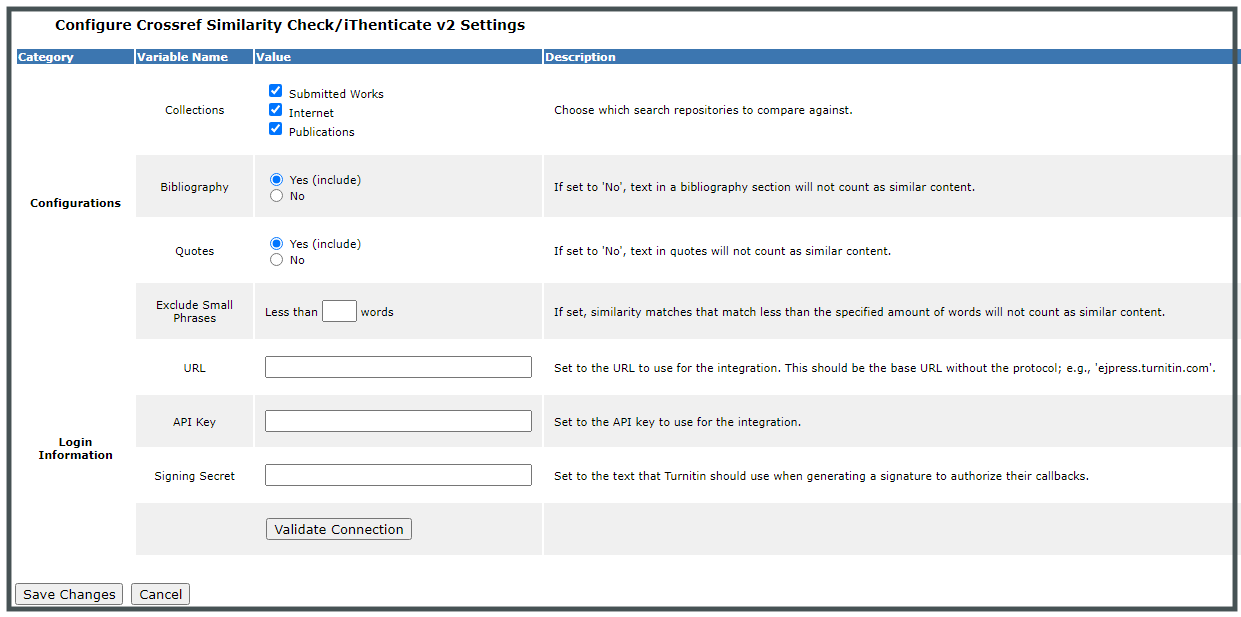
eJournalPress users will also be able to customise their iThenticate v2 settings via a configuration interface and to decide, for example, to include or exclude bibliographies from their Similarity Reports. The new integration will also show the top five matches returned by iThenticate directly in the eJournalPress interface.
eJournalPress configuration settings in iThenticate v2
Editorial Manager and ScholarOne
Aries (Editorial Manager) and Clarivate (ScholarOne) are planning to release their iThenticate v2 integrations later this year and we will be inviting users to upgrade in the coming months.
Please check our community forum for updates on manuscript tracking system integrations.
More new and improved features
User-friendly PDF report
“The report is clean and easy to read.”
– The National Academies of Sciences, Engineering, and Medicine
“The clickable links will save us a considerable amount of time as they make it easy for the author to understand where the overlap is coming from, meaning we do not need to spend time clarifying overlap reports to the authors. The summary page is also very useful as authors and editors are easily able to see which sections have been included and excluded from the report.”
– Frontiers
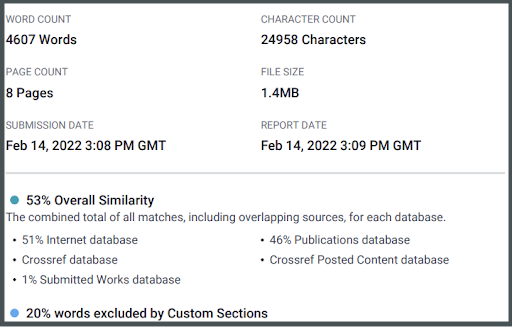
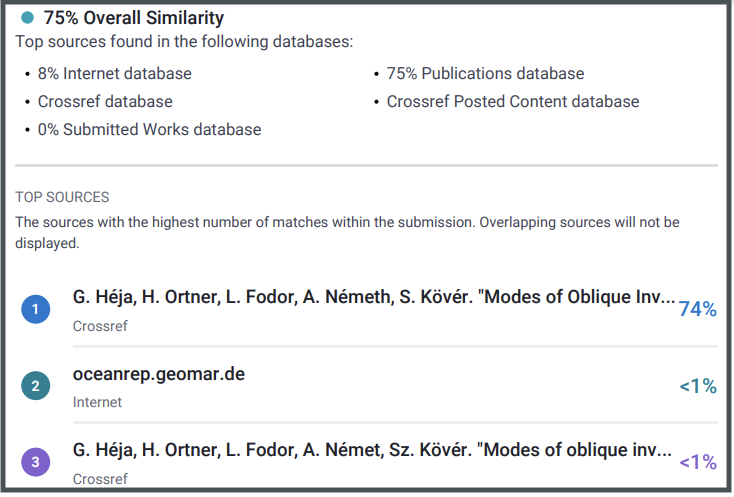
The PDF version of the Similarity Report has been completely redesigned and can easily be downloaded, emailed and printed. It contains a summary of the report i.e. word count, character count, number of pages, file size, excluded sections, submission, and report dates as well as the similarity score and a list of the top sources with clickable links.
First page of the Similarity Report in iThenticate v2
Summary and clickable links in the new Similarity Report in iThenticate v2
Custom section exclusion filter
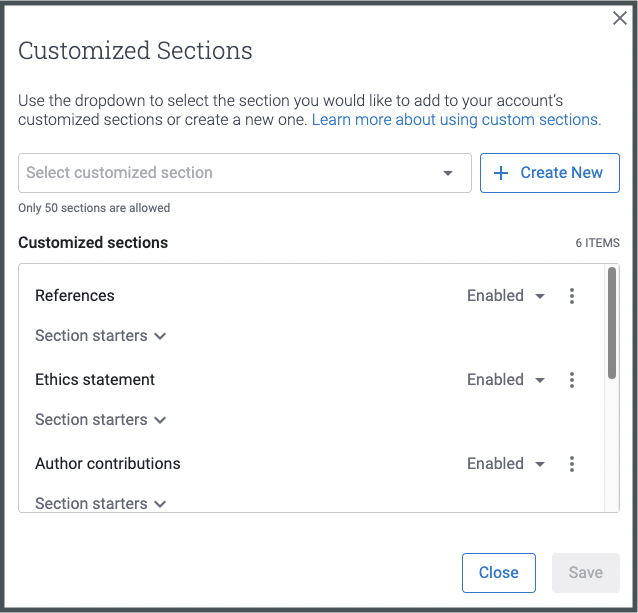
In iThenticate v2, users can now exclude sections that are standard such as authors, affiliations, ethics statements, acknowledgments, etc. from the Similarity Report which often impacts similarity scores. You can choose from the templates available and/or create your own custom section exclusions from the admin portal.
Custom section exclusion filter in the iThenticate v2 admin portal
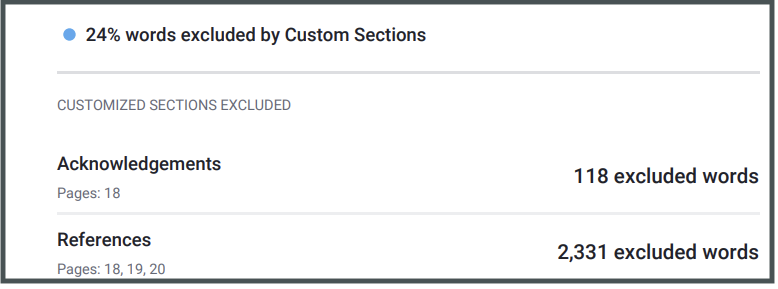
Summary of excluded custom sections on the iThenticate v2 Similarity Report
“The user interface is definitely more responsive than v1, especially when I am looking at the full-text viewing mode, scrolling through the text to compare matches, reading through the box of text in the matching source […] I also especially like the options around excluding, I was able to see our submitted work was also taken into the database and showed matches against the papers we’d uploaded already. Going forward, this is a really interesting thing for us, especially if we are looking at duplicated content in the same journal.”
– Taylor & Francis
User reporting
Details of user activity including folder names, similarity scores, word count, and file format are now also available in iThenticate v2 and downloadable as Excel and csv. files.
Up next
Product development
Further enhancements to existing features and interface such as the view full-text mode, user groups, and custom section exclusions are planned for this year. Paraphrase detection and citation matching are currently in development.
iThenticate v2 training
iThenticate v2 documentation is available from the Turnitin website. Training videos and webinars will be available later on in the year.
✏️ Do get in touch via support@crossref.org if you have any questions about iThenticate v1 or v2 or start a discussion by commenting on this blog post below.
Related reading
Blog
Similarity check update: A new similarity report and AI writing detection tool soon to be available to iThenticate v2 users